
RAM is one of the most misunderstood smartphone specifications. When evaluating how much ram budget android phone buyers actually need, the answer depends entirely on your daily app usage—and manufacturers often complicate things by advertising “virtual RAM” figures that mix physical hardware with storage-based swapping. Understanding how memory impacts performance helps you avoid overpaying for unnecessary specs or ending up with a device that constantly reloads your apps.
Quick Answer
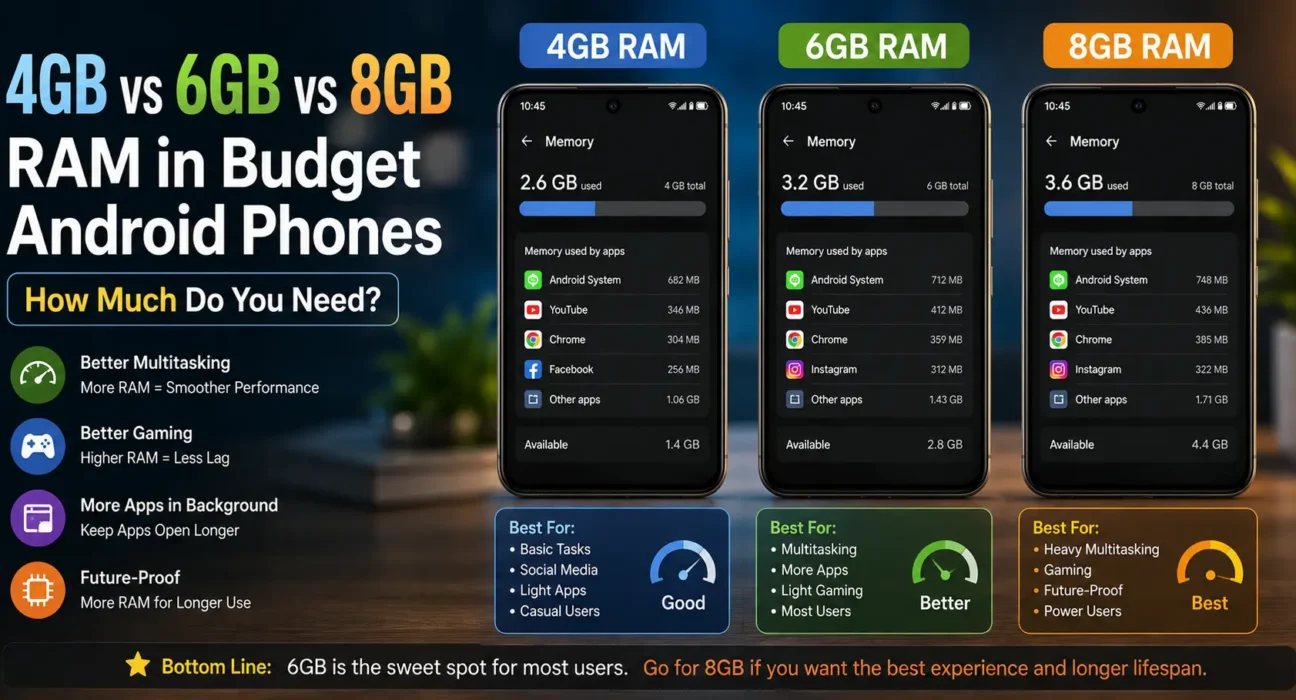
- 4GB RAM: Adequate for basic daily tasks like calling, messaging, web browsing, and single-app social media use. Expect frequent app reloads when switching between multiple tasks.
- 6GB RAM: The optimal sweet spot for most users. Delivers smooth multitasking, keeps apps cached longer in background memory, and easily handles casual to moderate gaming.
- 8GB RAM: Recommended if you play heavy 3D games, keep dozens of background apps open, or want long-term headroom as future Android OS updates demand more resources.
How Android Memory Management Works
Random Access Memory (RAM) acts as your phone’s short-term workspace, holding active applications and background services so the processor can switch between them instantly. According to Android memory management guidelines, when system RAM reaches full capacity, Android’s Low Memory Killer (LMK) driver automatically terminates idle background processes to free up memory for active tasks. This process is why low-RAM devices constantly force apps to reload from scratch.
4GB RAM: Baseline for Light Daily Use
A capacity of 4GB remains the baseline configuration on entry-level models like the Motorola Moto G (2026) and budget Samsung A-series devices. It reliably handles single-threaded workflows:
- Phone calls, SMS, WhatsApp, and messaging tools
- Web browsing across a few open tabs
- Social media feeds (Instagram, TikTok, or X) opened one at a time
- Standard media streaming and basic photography
Where 4GB struggles: Rapidly switching between navigation, music streaming, and camera apps will cause background applications to crash or restart, increasing battery drain and slowing down overall system responsiveness.
6GB RAM: The Practical Sweet Spot
Upgrading to 6GB of physical RAM fundamentally changes everyday usability. It gives the OS enough headroom to retain multiple heavy applications in active system memory without triggering premature background closures. 6GB comfortably supports:
- Seamless multitasking between social apps, browser tabs, and email clients
- Moderate gaming without closing communication apps running in the background
- Multi-window split-screen viewing and active picture-in-picture video playback
- Photo processing and basic mobile video editing
For most budget buyers, 6GB provides the ideal balance between performance longevity and affordability.
8GB RAM: High Performance and Future-Proofing
Physical 8GB RAM configurations, found on performance-focused budget phones like the Motorola Moto G Power (2026) and the TCL 60 XE NXTPAPER 5G, are targeted at heavy users:
- Sustained gaming sessions with high-texture graphics packages
- Extended background app retention (keeping 10+ apps ready to resume instantly)
- Multi-year future-proofing, ensuring snappy performance over 3+ years of app updates
- Intensive background tasks like automated cloud backups or heavy photo rendering
If your daily usage consists primarily of web browsing and messaging, an 8GB model will perform identically to a 6GB model—the extra memory benefits you only when pushing hardware to its operational limits.
Virtual RAM / Extended RAM Explained
Budget phone manufacturers frequently advertise total memory values using extended branding, such as “4GB + 8GB Virtual RAM.” This feature utilizes zRAM or swaps idle memory pages onto physical storage (eMMC or UFS). While helpful, virtual memory differs from physical RAM in two key ways:
- Read/Write Speeds: Internal storage speed is significantly slower than dedicated LPDDR RAM chips, resulting in latency when retrieving swapped background apps.
- Storage Allocation: Extended RAM claims dedicated internal flash storage that could otherwise store photos, videos, and offline media.
Always base your buying decision on the physical RAM specification rather than the virtual expansion figure.
Summary: Recommended RAM Configuration
| Target Usage Profile | Recommended Physical RAM |
|---|---|
| Calls, texting, basic browsing, single-app use | 4GB |
| Multitasking, active social media, casual gaming | 6GB (Best Value) |
| Heavy 3D gaming, multi-app workflows, 3+ year longevity | 8GB |
If you are deciding between a 4GB model and a 6GB model separated by a minor price difference, upgrading to 6GB yields the most noticeable improvement in day-to-day speed and app stability.
FAQ
How much ram budget android phone models need for basic daily use in 2026?
4GB of physical RAM is sufficient for light daily use like calling, texting, and web browsing. However, 6GB is strongly recommended for smoother multitasking and to prevent background apps from constantly restarting.
Is 4GB RAM enough for gaming on a budget Android phone?
4GB can run lightweight or casual games, but modern demanding titles require 6GB to 8GB of RAM to prevent frame drops, overheating, and forced app closures.
Does virtual RAM perform the same as physical RAM?
No. Virtual RAM relies on internal storage, which operates at lower transfer speeds compared to physical LPDDR RAM modules. It serves as a secondary overflow cache rather than a true replacement.
Will having more RAM improve my phone’s battery life?
Indirectly, yes. When a phone has enough RAM, it restores apps directly from system memory instead of forcing the CPU to reload app assets from internal storage, which reduces processor workload and battery draw.
Can low RAM cause lag and stutter on Android phones?
Yes. When RAM fills up completely, the CPU works extra hard to constantly clear and reload system caches, causing visible interface stutter. For additional performance troubleshooting, read our guide on how to fix lag and stutter on budget Android phones.
Final Takeaway
Choosing how much ram budget android phone buyers need comes down to balancing current usage habits with future software demands. A 6GB physical RAM configuration offers the best price-to-performance sweet spot for most users in 2026. Opt for 4GB only on ultra-budget devices dedicated to basic communication, and step up to 8GB if long-term longevity and gaming are your primary priorities. For a complete guide on selecting display, camera, and chipset specs, explore our full Ultimate Buyer’s Guide to Budget Android Phones in 2026.
Related Guides: How to Fix Lag and Stutter on Budget Android Phones · Best Cheap Android Phones Under $200 · Best Budget Android Phones with 120Hz Displays Under $300